Creating a new state
Let’s take a similar example to here, i.e. we want to create a state that generates a new random position for the end effector of the robot. However, this time we want the state to return a PoseStamped msg, so we can plan and move the robot to this pose.
1. Content of the state
In order to complete the aforementioned task, a valid implementation of the state would be:
#!/usr/bin/env python

import smach
# Import other packages
import rospy
import numpy as np
from grip_core.utils.message_utils import generate_pose_stamped_message


class GenerateRandomPose(smach.State):

  """
      State generating a random Pose msg within given boundaries
  """

  def __init__(self, boundaries, reference_frame="world", output="generated_pose", outcomes=["success", "failure"],
               input_keys=[], output_keys=[], io_keys=[]):
      """
          Initialise the attributes of the class

          @param output: String, specifying the name to set to the counter. Default is "counter"
          @param outcomes: Possible outcomes of the state. Default "success" and "finished"
          @param input_keys: List enumerating all the inputs that a state needs to run
          @param output_keys: List enumerating all the outputs that a state provides
          @param io_keys: List enumerating all objects to be used as input and output data
      """
      # Initialise the state
      smach.State.__init__(self, outcomes=outcomes, io_keys=io_keys, input_keys=input_keys, output_keys=output_keys)
      if not isinstance(boundaries, list) or len(boundaries) != 6:
          rospy.logerr("\"Boundaries\" should be a list containing a total of 6 elements")
      self.boundaries = boundaries
      self.reference_frame = reference_frame
      self.output = output
      # Outcomes of the state
      self.outcomes = outcomes

  def execute(self, userdata):
      """
          Randomly generate a new pose between the boundaries provided

          @param userdata: Input and output data that can be communicated to other states

          @return: - outcomes[-1] ("failure" by default) if the configuration of the state is not correct
                   - outcomes[0] otherwise
      """
      # Make sure the boundaries are float or integers, otherwise return the outcome failure
      if any(not (isinstance(x, int) or isinstance(x, float)) for x in self.boundaries):
          rospy.logerr("Boundaries should be integer or float")
          return self.outcomes[-1]
      # Generate the position from the boundaries
      x = np.random.uniform(self.boundaries[0], self.boundaries[3])
      y = np.random.uniform(self.boundaries[1], self.boundaries[4])
      z = np.random.uniform(self.boundaries[2], self.boundaries[5])
      # Generate the orientation of the pose randomly as well (could also be added to the configuration of the state)
      roll, pitch, yaw = np.random.uniform(0, np.pi, size=3)
      # Create the PoseStamped message using the utilities provided by GRIP
      pose_msg = generate_pose_stamped_message(self.reference_frame, [x, y, z], [roll, pitch, yaw])
      # Store the generated msg inside the userdata
      userdata[self.output] = pose_msg
      return self.outcomes[0]
Note that in this implementation, we made it so the state expects a list containing the boundaries as input. In other words, the boundaries must look like
[min_x, min_y, min_z, max_x, max_y, max_z].2. Storing the state
You can either store your new state directly in
/home/user/projects/shadow_robot/base/src/grip/grip_core/src/grip_core/states (not in the commander folder) or create a new dedicated folder anywhere you want inside the docker container.In the first case, the added state will be available for all the tasks.
On the other hand, if you want some specific states to appear only for some tasks, you can create folders in
/home/user/projects/shadow_robot/base/src/grip/grip_core/src/grip_core/ containing a __init__.py file. Store the files containing the code of the states you want to add in the created folder. You can import them by clicking on Import states in the task editor. Select the newly created directory and the states will appear in the tab. They will be imported everytime you open this task (make sure the folder still exists though).In any case, given that the name of the state is
GenerateRandomPose, the file must be named generate_random_pose.py. Otherwise, GRIP will not accept this new state.3. Using the state
If you reproduce the following task and execute it with the UR5 arm and EzGripper in simulation, you should be able to see the robot moving to a new random pose. Feel free to execute the task several time, you should see the robot move several times (it might fail sometimes because of collisions).
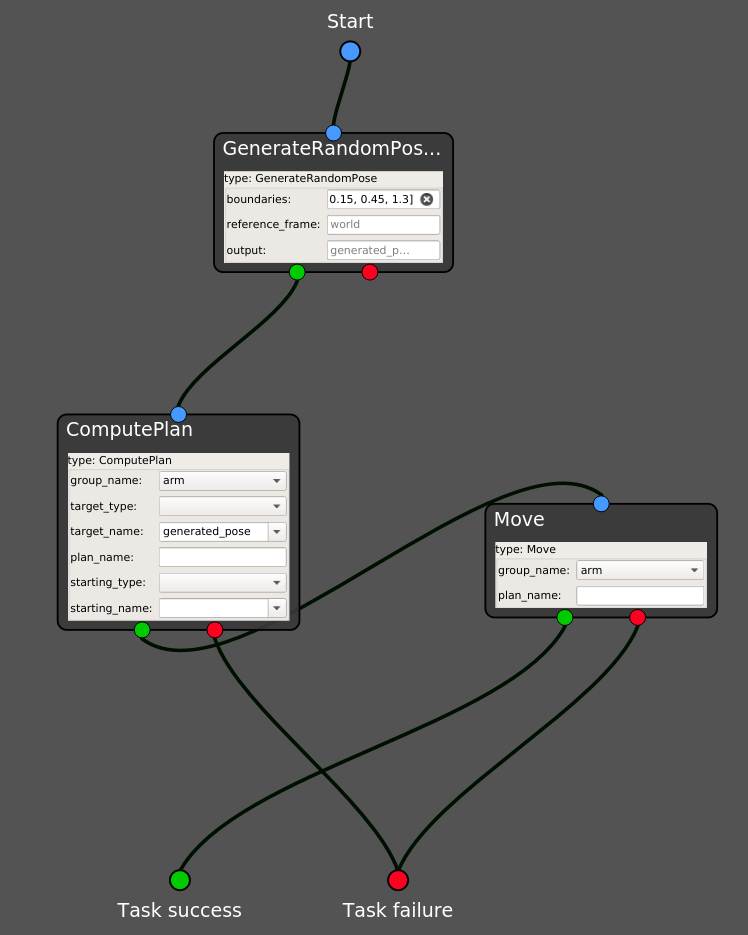
In our example, we used
[-0.15, 0.15, 0.84, 0.15, 0.45, 1.3] as parameter for the boundaries configuration slot in the task editor.Warning
This state is safe to use in simulation, however we strongly discourage you to use on the real robot. In fact, it can produce plans involving ample motions of the arm, which are not advised to be executed on the real platform.
If you want to use it on the real robot, you can tune the given state, by for instance by hardcoding the orientation or tuning hte boundaries.